June 23, 2010, 10:00
Update 18. nov 2011: fixed some bugs, as mentioned by Patrick S. (great to see, that some take and use the code):
- screen_width and height for WriteRDP()
- read FitToScreen from reg in readReg()
- check for already running process of startOnExit in startTSC(). Although I think check for running a process multiple times should be done in the target process.
Update 16. may 2011: converted code for VS2008(windows mobile 6 sdk), see Downloads at bottom
UPDATE 23 june 2010: new registry option to switch between MouseClick and Keyboard simulation:
REGEDIT4
[HKEY_LOCAL_MACHINE\Software\RDP_autologin]
"FitToScreen"="1"
"FullScreen"="1"
"Status"="connecting..."
"Save Password"="1"
"Domain"=""
"Password"="Intermec+2004"
"Username"="rdesktop"
"Computer"="192.168.0.130"
"DesktopWidth"=640
"DesktopHeight"=480
"startOnExit"="\rdp_keepBusy.exe"
"execargs"="noRDPstart"
"UseMouseClick"="0"    //added with version 3 to switch between mouse and keyboard simulation
Some days ago I published my RDP_Autologin code: RDP_Autologin
As there were some screen metrics hardcoded and more and more devices come with a VGA screen the hardcoded QVGA values will not match. So I extended the first version and implemented some additional logic and settings.
Continue reading ‘Automated Login for Remote Desktop Mobile II’ »
June 11, 2010, 17:22
Some times ago I published my modded GPS_Sample code (see http://www.hjgode.de/wp/2009/05/12/enhanced-gps-sampe/), which is based on a MS GPSsample.
This time I added support for Int*rm*c CN50, which does NOT support reading raw GPS data using a serial connection. Instead the CN50 streams the data to the ‘communication’ port.
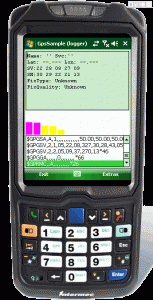
BTW: did you know how easy it is to create skins for use with MyMobiler?
Continue reading ‘Enhanced GPS sample update’ »
June 9, 2010, 19:00
For an actual project I needed a tftp server service for a Windows 2003 server. I looked around in internet and only found tftp servers running in user space, no real windows service. So I searched for source code applications I could use and found tftpUtil at sourceforge.net (http://sourceforge.net/projects/tftputil/). Although the short description states it would implement a service, it does not in reality. But the tftpUtil class was more or less easy to use and so I started to write a service ‘wrapper’ around it.
        protected override void OnStart(string[] args)
        {
            AddLog("OnStart entered...");
            StartTFTPServer();
...
        }
Continue reading ‘Writing a tftp server windows service’ »
June 1, 2010, 19:55
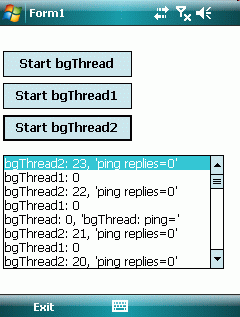
Although there are well know ways to update the GUI from a background thread not running in the GUI thread, I looked for an easiest to use solution. After some experiments I got a background thread class that is very easy to use. No BeginInvoke or Control.Invoke needed any more to update a GUI element.
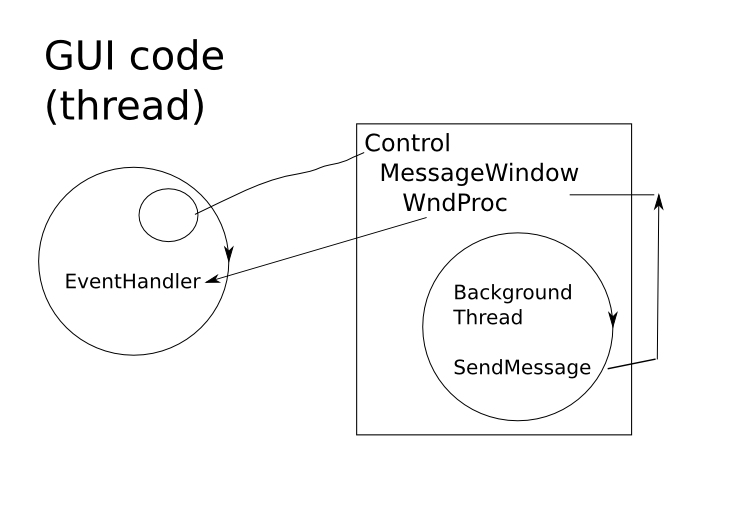
The final solution uses a MessageWindow inside a control based class with a worker thread. As the control and the MessageWindow is part of the GUI thread, there is no need to use Invokes.
Inside the thread I use SendMessage to transfer background thread informations to the control, which then fires an event you can subscribe in the GUI thread.
The test app attached shows three threads running independently and all update the GUI frequently without blocking the GUI.
Here is my try to visualize my idea and solution
Continue reading ‘Mobile Development: Easy to use background thread with GUI update’ »
Tags:
Background Thread,
C#,
Compact Framework,
DotNet,
event handler,
GUI thread,
Invoke,
MessageWindow,
Mobile Development,
SendMessage,
WM_COPYDATA,
WndProc,
Worker Thread Category:
CodeProject,
Programming |
Comments Off on Mobile Development: Easy to use background thread with GUI update



 http://www.led-mg.de