June 15, 2009, 20:50 -
Bad experiences with Windows Mobile 6.1 encryption file EncFiltLog.menc
Today I was frightened as I tried to read the data I saved from a Windows Mobile 6.1 device to my MicroSD card from my Windows XP desktop PC. WinXP recognized the usb stick as changeable device but no drive and no contents. Simply “please insert drive”.
Continue reading ‘Windows Mobile Memory Card Encryption stops WinXP from reading the card’ »
June 14, 2009, 08:09 -
A threaded form uploader app in C#
Recently I had to do an app that watches a dir for new files and then uploads them to a DocuShare server using http form post.
I was told, that it is very easy to use form post from code and decided to do the app in C#. Unfortunately, it was not that easy to find code that does uploads via form post, especially for Compact Framework (CF). Maybe it is easier in JAVA, but for JAVA I had to install a JAVA VM onto the windows mobile 6.1 device and for CF all runtimes are already on the device. I searched the internet for valuable form post code in C# and found one titled ‘C# is the better JAVA‘.
OK, this code looked good and i tried it within Compact Framework. After changing the functions to ones available in CF, the code runs fine. As you know, CF does not have the same full featured functions as the .Net Framework for PCs.
Continue reading ‘Windows mobile worker thread to post form data using a queue’ »
June 13, 2009, 12:30 -
Recently I stumbled over this very anoying feature of the Microsoft Internet Explorer Mobile (IEM). IEM is NOT able to open local webserver pages! Neither within WM5 nor WM6.1. You can test this using the stand-alone Windows Mobile emulator:
Continue reading ‘Internet Explorer Mobile can not access 127.0.0.1 / localhost’ »
June 11, 2009, 10:42 -
zDump
Do you like to spy your WinCE device? Try zDump! I used it to find the window classes and styles of iesample.exe to be able to write iLockIE2.
You can use it to inspect windows and there styles and you can CHANGE there styles (ie disable the taskbat window).
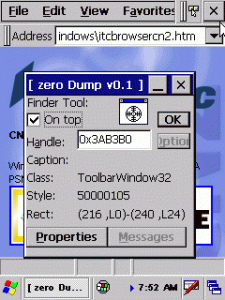
In this screen I spyed the X button of iesample.exe.
[Download not found]




 http://www.led-mg.de