Archive for the ‘Windows Mobile Information’ Category.
November 9, 2015, 08:22
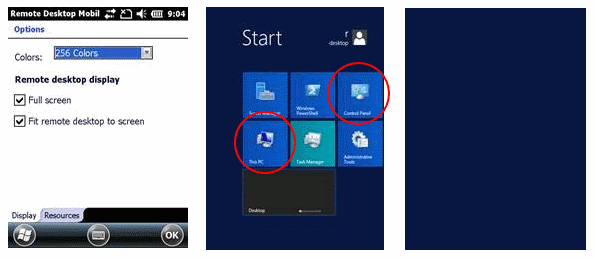
Recently I had to realize that w2k12 only shows an empty background when connecting to a new Terminal Service session and the requested resolution is 240×320, 480×640 or 480×800. These reolutions are used by Remote Desktop Mobille if you select the option “Fit remote desktop to screen”.
After login, the Start screen (Metro-Ui) is shown, regardless of having set TS to start new sessions always in Desktop mode. If you then start a desktop application or simply the “Control Panel” or “My Computer”, which are Desktop apps both, the screen changes to show an empty (Start screen) background only.
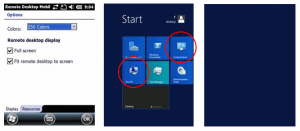
The apps are started on the desktop, but the desktop will not be shown by TS!
Continue reading ‘Windows 2012 R2 Terminal Service does not render Desktop if resolution width less than 600’ »
December 3, 2013, 10:48
Recently I looked for support of starting an alternative shell when using Remote Desktop Mobile on a Windows Embedded Handheld 6.5.3 device.
MSDN says that I can to specify AlternateShell in a rdp file. As Windows Mobile devices always use \Windows\default.rdp, I added the following two lines and tested what happens.
WorkingDir:s:C:\Program Files (x86)
AlternateShell:s:C:\Program Files (x86)\notepad.exe
Unfortunately the above entries are ignored 🙁
But why? I decided to look inside wpctsc.exe I dumped of a WEH device to see which strings (used sysinternals strings app) are known to the Mobile Remote Desktop client. And, no surprise, AlternateShell is not known inside wpctsc.exe. But I saw two other interesting strings around the ones used in rdp files.
Continue reading ‘Windows Mobile: Hidden Remote Desktop Client Clipboard support’ »
March 22, 2012, 11:08
Here a small tip:
To disable all Connection Manager Dialogs set the following registry key:
[HKLM]Software\Microsoft\Shell\Rai\:MSREMNET\Disable
“All”=dword:1
to disable only certain dialogs or notification bubbles, use IDs like IDS_RAS_CARRIER_DROPPED:
[HKLM]Software\Microsoft\Shell\Rai\:MSREMNET\Disable
“0”=dword:1
to disable multiple dialogs, simply define additional IDs. For example to disable dialogs for IDS_RAS_DEVICE_NOT_READY and IDS_RAS_NO_ANSWER:
[HKLM]Software\Microsoft\Shell\Rai\:MSREMNET\Disable
“3”=dword:1
“5”=dword:1
Have fun
List of all IDS values:
December 20, 2011, 10:07
Hello
I want to summarize the role of function keys in Windows Mobile, former Pocket PC, as I got several questions each week on how to use or enable Function keys in this or that application.
Here is a simple information about how function keys work in Windows Mobile.
Continue reading ‘Windows Mobile – the no-go world of Function Keys’ »
Tags:
AllKeys,
Function Key,
Internet Explorer Mobile,
remote desktop mobile,
UnregisterFunc1,
windows mobile Category:
CodeProject,
Int*rm*c,
Keyboard,
kiosk mode,
Programming,
Tips,
Windows Mobile Information |
Comments Off on Windows Mobile – the no-go world of Function Keys



 http://www.led-mg.de