November 4, 2013, 16:21
Since IE6 comes as 6.1.4 or higher, Internet Explorer Mobile can work in IE6 or the older PIE mode.
IE6 means Internet Explorer 6 desktop compatible mode. Which works more or less with known and unknown restrictions. The biggest advantage is that Internet Explorer (IEM) >=6.1.4 supports keyboard event DOM of javascript.
For some web sites you may downgrade to PIE (Pocket Internet Explorer) mode. You will get scroll bars and a standard menu bar and no on-screen zoom option.
Continue reading ‘Windows Mobile 6 – Internet Explorer Mobile modes’ »
Tags:
desktop view,
HTML,
IEM,
Internet Explorer Mobile,
mobile view,
one column view,
PIE,
Pocket Internet Explorer,
windows mobile,
Windows Mobile 6 Category:
CodeProject,
HTML,
Programming |
Comments Off on Windows Mobile 6 – Internet Explorer Mobile modes
January 23, 2013, 12:00
As described in this post, I was looking for a way to get a proper view of pages designed for QVGA screens on devices with higher resolutions like VGA.
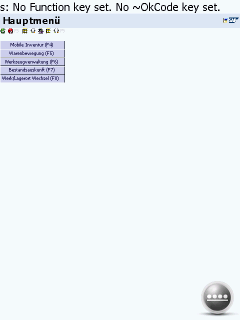 1) SAP ITS mobile screen on VGA Internet Explorer Mobile |
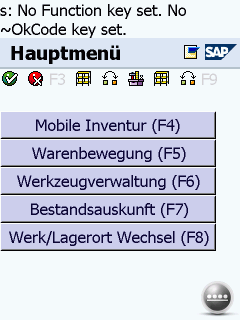 2) SAP ITS mobile screen on VGA display with viewport width=240 and zoom=2 |
Continue reading ‘Internet Explorer Mobile – QVGA web site do not scale well to VGA screen’ »
Tags:
HTML,
IEM,
Internet Explorer Mobile,
ITS mobile,
kiosk mode,
Programming,
SAP,
windows mobile,
Windows Mobile 6 Category:
CodeProject,
HTML,
kiosk mode,
Programming,
Tips |
Comments Off on Internet Explorer Mobile – QVGA web site do not scale well to VGA screen
January 21, 2013, 21:00
With Windows Mobile 6.5.3, sorry, Windows Embedded Handheld 6.5.3 we have the Internet Explorer Mobile 6 engine.
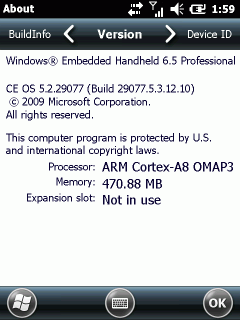
Although it may look nice for the one or other, the rendering, especially the zoom in and out is unusable for commercial use. The IT departments of Warehouses and Stores designed there mobile web pages for a fixed size layout of 240×320 (QVGA). Using IEM (Internet Explorer Mobile) these pages do not show well. Either they are to small to read or, if zoomed in, the user has to scroll here and there. Not very usable. Event the Fit-To-Screen option does not help.
The predefined viewport or 1024×768 may be good for browsing non-mobile web sites but I was unable to find a suitable setting for mobile sites with a fixed QVGA or VGA layout.
Here comes the tipp found at xda-developers: change the default viewport size to match your needs:
Default:
HKCU\Software\Microsoft\Internet Explorer\Main
Viewport Height = dword:00000258(600)
Viewport Width = dword:00000320(800)

Landscape optimized (VGA)
HKCU\Software\Microsoft\Internet Explorer\Main
Viewport Height = dword:000001e0(480)
Viewport Width = dword:00000280(640)

Portrait optimized (VGA)
HKCU\Software\Microsoft\Internet Explorer\Main
Viewport Height = dword:00000280(640)
Viewport Width = dword:000001e0(480)
I assume you will find these better for commercial use than the desktop settings.
Unfortunately these settings are not used on every windows embedded device. So, you may give it a try and if it works for you, fine. I tested one device and iexplore.exe did not care about these entries. I checked with RegLoggerCE and found that iexplore.exe on that device does not query the above settings. For anyone interested, here is the log file of registry access of iexplore.exe captured with regLoggerCE: [Download not found]
December 13, 2011, 06:21
Hello
[updated 21. dec 2011, see code change]
I had the need to alter the OpenCart (1.5.1.3) order confirmation eMail to include some legal text (german Impressum (company contact) and Wiederrufsbelehrung, Stichwort Abmahnung) and to remove the display of the IP.
To be able to watch and debug my code additions, I had to setup a development system for the OpenCart shop instance:
Continue reading ‘Develop an OpenCart vqmod to alter the confirm eMail’ »
Tags:
abmahnung,
HTML,
impressum,
netbeans,
opencart,
php,
vqmod,
wiederrufsbelehrung Category:
CodeProject,
HTML,
OpenCart,
Programming,
Uncategorized |
Comments Off on Develop an OpenCart vqmod to alter the confirm eMail




 http://www.led-mg.de